
How to Run Geo-Grid Scans With an AI Agent Over MCP
Most local SEO tools treat AI as a chatbot bolted onto a dashboard. There’s a different model emerging, your AI agent as the operator, triggering scans, reading results, and reporting back while you do something else. This post explains the workflow and how to set it up with an MCP-compatible agent.
Why agents change the geo-grid workflow
A geo-grid scan was always the easy part, the tool does it. The expensive parts were everything around it, deciding what to scan, noticing what changed, interpreting why, and writing it up. That’s exactly the work agents are good at.
Concretely, an agent with access to your scan data can do the following.
- Queue the Monday roster, “scan all weekly projects”, and confirm completion.
- Diff the last two scans and tell you what moved, in plain language. “Visibility in the northeast quadrant dropped six points; two cells lost to [competitor].”
- Run the competitor analysis skills, who outranks you where, and which of their signals differ.
- Draft the client update from the actual deltas, in your tone, before your coffee’s done.
The difference between this and “AI insights” buttons in web dashboards is agency. The agent isn’t a widget, it runs the workflow end to end.
What MCP is, in one paragraph
Model Context Protocol is an open standard that lets AI assistants call external tools over a local endpoint. Apps like Claude Desktop, Codex, and Cursor speak it natively. An app that “ships an MCP server” exposes its functionality as callable tools, and the agent decides when to call them, based on your instructions.
The GeckoGrid setup
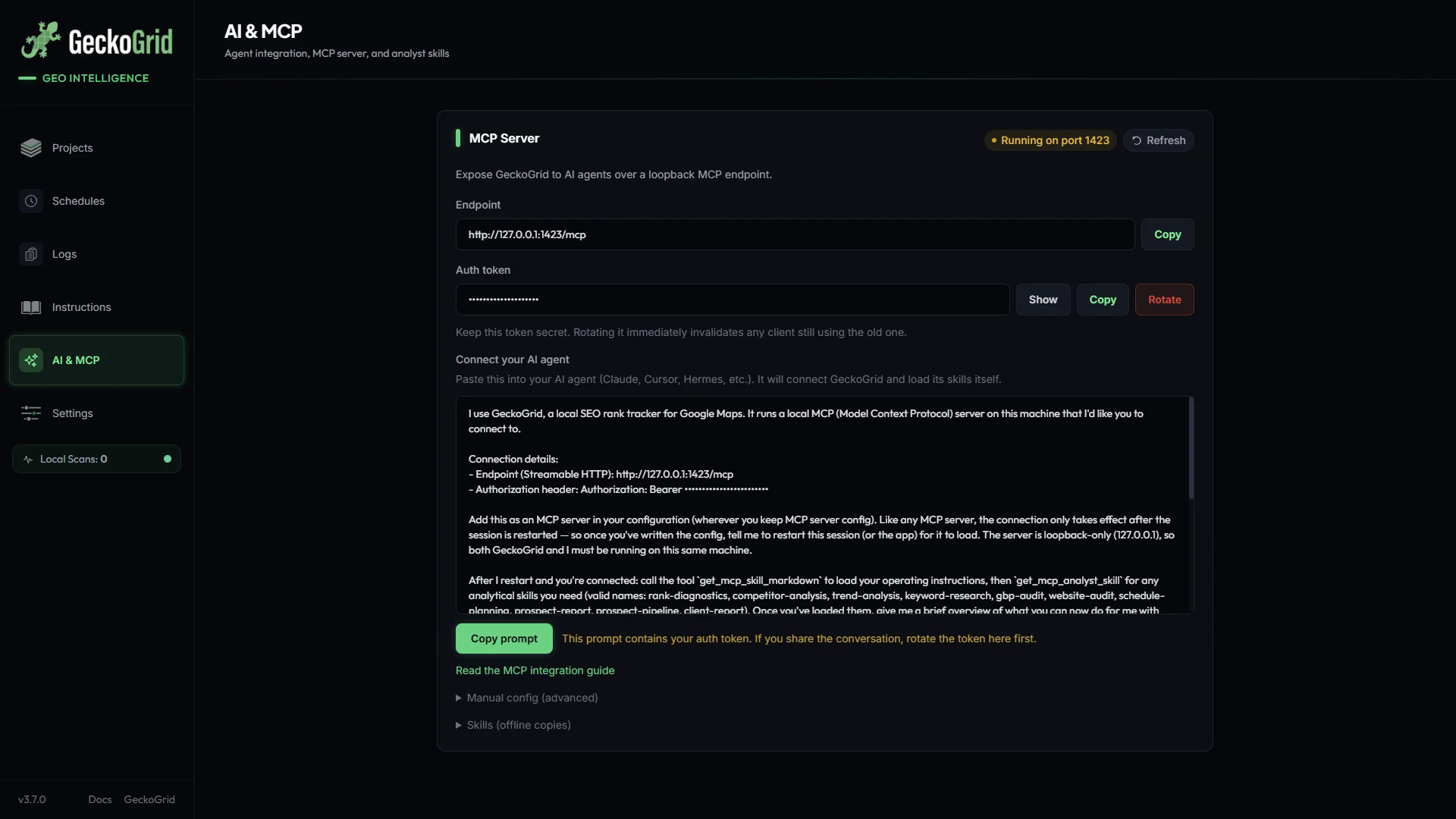
- Open AI & MCP in GeckoGrid and enable the server. It runs on your machine as a loopback endpoint, protected by a bearer token, no cloud hop, and the token lives in your OS keychain.
- Copy the generated setup prompt from the same screen into your agent’s configuration. Claude Desktop, Cursor, Codex all accept MCP server config, and the prompt is written so the agent loads GeckoGrid’s workflow automatically.
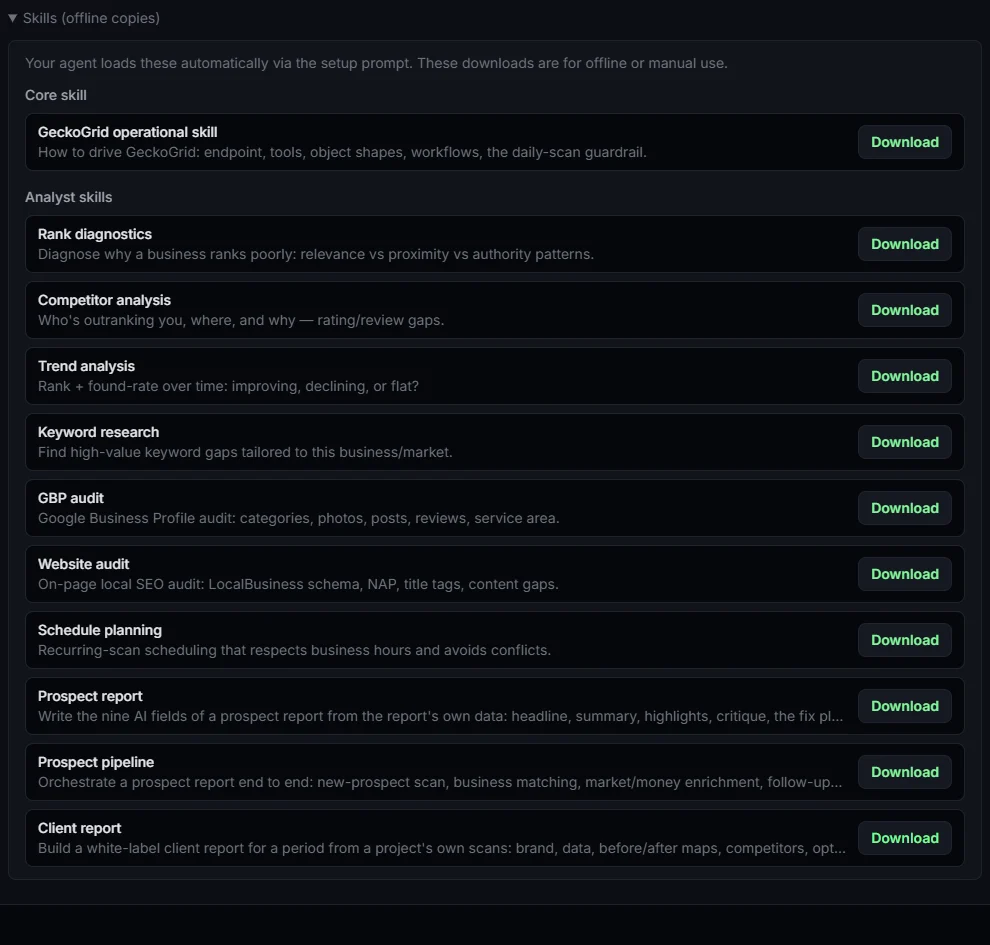
- Restart the agent session. It should now list GeckoGrid’s tools, 47 of them, plus ten bundled analyst skills covering rank diagnostics, competitor analysis, trend analysis, keyword research, GBP audit, website audit, schedule planning, client reports, prospect reports, and prospect pipelines.
One requirement, the agent and GeckoGrid run on the same machine, since the server is local by design. That’s the feature, not a limitation. Your project data and scan history never leave the machine.
Three workflows to try first
The Monday brief. “Check every weekly project for completed scans from the last 7 days, summarize rank deltas by keyword, and flag any cell where we dropped out of the top 3.” This alone replaces an hour of dashboard-clicking per client.
The competitor brief. “Open the competitor leaderboard for [project], identify who’s gaining, and compare their rating and review counts against ours at the points where they pass us.” The skill output is a work order, not a vibe.
The audit loop. After making GBP changes, “re-scan [project] on the same grid and tell me whether the northeastern dead zone improved.” Because local scans are unmetered, this loop can run as often as the work deserves. No credit metering your curiosity.
Why unmetered scanning matters more in the agent era
Here’s the part nobody advertises. On credit-metered platforms, an AI agent is a cost amplifier, every automated re-scan burns pins against the same credit pool a human was already rationing. The economics cap the automation.
Unmetered local scanning inverts it. The agent can iterate, scan after an edit, scan after a review push, scan tomorrow to confirm, and the marginal cost is your electricity. That’s why GeckoGrid is built AI-native first. The MCP server is on every plan including the $19 Solo tier, with no per-tool or per-scan charges for your agent.
The local SEO teams adopting agents now aren’t working more hours. They’ve just stopped being the middleware between the scanner and the report.
Keep reading
How to Win Local SEO Clients With a Geo-Grid Prospect Audit
A practical prospecting workflow for agencies and freelancers: pick the right local businesses, scan them, turn the heatmap into a short audit with a fix plan, and send outreach that gets replies.
How to Track Google Maps Rankings Over Time Without Fooling Yourself
Most rank trends lie a little. How to track local Map Pack rankings over weeks and months so the change you report is real: one rank definition, identical grids, one engine, and the right views.
How to Present Heatmaps to Clients for Local SEO Reporting That Retains
Turn geo-grid scans into client reports that survive procurement meetings, the five-slide structure, which numbers to lead with, and the mistakes that make heatmaps feel like decoration.