
Geo-Grid Sizes Explained, From 3x3 to 9x9

Pick the wrong grid size and every scan after it lies to you a little. Too sparse and you miss the block where you vanish. Too dense and you pay for resolution you don’t need, in scan time, and on metered tools, in credits.
Here’s how to choose, and why the choice deserves to be permanent.
The four standard sizes
| Grid | Points | Best for | Typical coverage |
|---|---|---|---|
| 3x3 | 9 | Quick checks, single neighborhood | A few blocks to ~2 miles |
| 5x5 | 25 | Single-location businesses in urban markets | A neighborhood to a district |
| 7x7 | 49 | The agency workhorse, most local markets | A full city district |
| 9x9 | 81 | Suburbs, service-area businesses, big territories | A whole city or metro edge |
Square, hexagon, or circle
Size isn’t the only lever; GeckoGrid also lets you pick the grid’s shape. A square grid is the classic N×N layout above. Hexagon and circle grids fit a round market better: they drop the far corners of the square, where you’d be scanning places a customer is unlikely to search from, and they space points more evenly from the center.
Because they don’t have N×N points, GeckoGrid labels them by shape and point count:
| Size | Square | Hexagon | Circle |
|---|---|---|---|
| 5 | 25 | 19 | 20 |
| 7 | 49 | 37 | 39 |
| 9 | 81 | 61 | 64 |
So a Circle 9 covers roughly the same reach as a 9x9 square with about a fifth fewer points, which matters if you scan through a paid API. For most service-area businesses, a circle is the more honest picture of the territory.
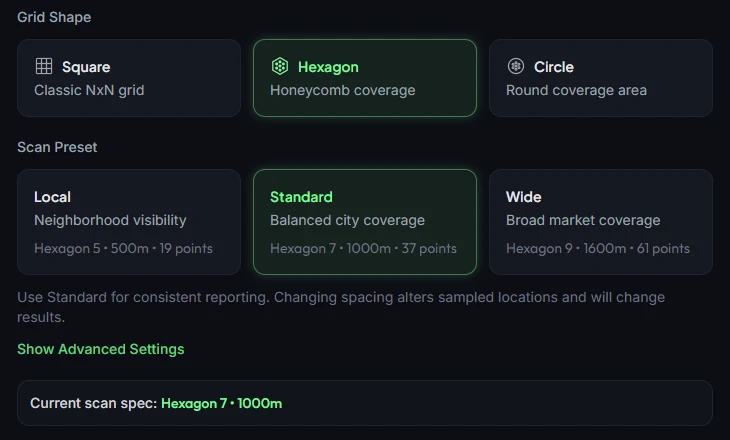
Points are only half the setting, spacing is the other half. A 7x7 grid at 0.5-mile spacing covers a completely different market than a 7x7 at 2-mile spacing. Grid size sets the resolution; spacing sets the reach.
Matching density to the market
Dense urban (coffee shop, salon, downtown office). Rankings change block by block, so resolution matters more than reach. A 5x5 or 7x7 with tight spacing (0.25–0.5 miles) captures the reality that your best competitor is 800 meters away.
Suburban service business (plumber, HVAC, roofer). Customers search across a whole service area, and proximity matters less per block. A 7x7 or 9x9 with 1–2 mile spacing maps the territory you actually sell in.
Service-area businesses without a storefront. Widen the grid deliberately. Your grid should cover where customers are, not where your address is, center it on the service area’s population, which is not always your office.
Quick competitive audit. A 3x3 is a sanity check, not a monitoring tool. Useful for “did the rebrand break something?” or checking one suspicious neighborhood, but too sparse for tracking.
One grid per project, forever
Whichever you pick, the critical rule from our cadence guide applies doubly here, never change grid size mid-project. Comparing scans only works when the sample points are identical. A 7x7 and a 9x9 don’t just have different resolution; the points land in different places, so cell-by-cell comparison is meaningless.
Write the grid spec into the project (GeckoGrid saves grid size, center coordinate, spacing, and keywords with each project) and leave it alone. If a market genuinely outgrows its grid, start a new comparison history from the change date. GeckoGrid’s Scan History helps here: when a keyword’s newest scan ran on a different spacing or point count than the one before, it shows Grid changed instead of a misleading rank change.
Grid size and scan cost
This is where pricing models matter more than most people realize. On credit-metered platforms, a 9x9 costs 81 credits per keyword versus 25 for a 5x5, the grid choice becomes a recurring budget decision, and it pressures you to under-scan. With unmetered local scanning the grid choice is purely analytical, pick the density the market deserves and scan it as often as the cadence calls for.
That freedom compounds. When grid size stops being a budget line, you can afford the honest answer, which is sometimes an 81-point map of exactly where your visibility ends.
Frequently asked questions
What is the best grid size for a small local business?
For a single neighborhood or dense urban market, a 5x5 grid (25 points) is usually the right starting size. It covers the area where customers realistically search, scans fast enough to run weekly, and is fine-grained enough to show where you are strong or weak. If your business serves a wider area or multiple neighborhoods, step up to 7x7.
Can I compare a 5x5 scan with a 7x7 scan?
Not meaningfully. Changing grid size changes where every scan point lands, so cell-by-cell comparison becomes meaningless. Pick a grid size for a project and keep it consistent. If your market genuinely grows, start a new comparison history from the change date.
Does a bigger grid always mean better data?
No. Bigger grids cost more scan time and, on credit-metered tools, more money, and they add resolution you may not need. A 9x9 grid covering a city you do not serve is not better data, it is wasted points. Match the grid to where your customers actually are.
How do I choose the right spacing for my grid?
Match spacing to how far customers travel for your service. Dense urban markets work well at 0.5-mile spacing. Suburban and service-area businesses usually need 1 to 2-mile spacing to cover the full territory their trucks or patients actually cover.
What if my market outgrows the grid I started with?
Start a new comparison history from the change date rather than trying to force old and new data together. The grid you freeze at kickoff is the one you keep for the life of that comparison history.
Keep reading
Geo-Grids for Service-Area Businesses, Tracking Without a Storefront
Plumbers, HVAC, mobile detailers, how to run geo-grid scans when customers never visit your address, from centering the grid to judging coverage instead of center rank.
How to Run Your First Geo-Grid Scan Step by Step
A complete walkthrough of your first geo-grid scan, choosing the keyword, grid size, and center point, running the scan, and reading your first heatmap.
How Often Should You Run Geo-Grid Scans?
Daily, weekly, or monthly? How to pick a geo-grid scan frequency per client tier, why consistency beats volume, and how to automate the schedule.