
Google Business Profile Categories: How to Choose Them and Test the Change

If you only change one thing on a Google Business Profile this year, make it a deliberate decision about the primary category. It tells Google what the business is, and it shapes which searches the business is even eligible to rank for before reviews, proximity, or the website come into play.
The trouble is that most people pick a category once, at setup, and never look at it again. Here’s how to choose categories properly, and how to prove a change helped instead of hoping it did.
How categories work
Every profile gets one primary category and up to nine additional categories. The primary carries far more weight. Additional categories widen the net for related services: a plumber might be primary “Plumber” with additional categories like “Water heater installation service” or “Drainage service”.
Categories come from Google’s fixed list, so you can’t invent your own. There are thousands of them, and many trades have several near-duplicates that behave differently: “Lawyer”, “Law firm”, “Personal injury attorney”. The more specific option usually wins for specific searches, as long as it truthfully describes the business.
Choosing the primary category
Ask a blunt question: what does this business mainly get paid to do? Then find the most specific category that’s honest about it.
- A dentist who mostly does general family care should stay “Dentist”, even if implants are more profitable; a practice built around implants could reasonably choose “Dental implants periodontist” if that’s accurate.
- An HVAC company that mostly does AC work in a hot market might outperform as “Air conditioning contractor” for AC searches compared with a generic “HVAC contractor”.
- A personal injury practice is better described as “Personal injury attorney” than “Lawyer”.
Don’t pick a category for a service you rarely do. Beyond the risk of a suspension, it can pull relevance away from the searches that actually make money.
See what’s winning in your market
Before changing anything, look at what the businesses beating you use. Run a geo-grid scan for your main keyword and open the top 20 at a few points where you’re weak; the businesses above you there are the ones whose categories you need to know.
The rank panel in the app shows names, ratings, and reviews, so the quickest manual check is the leaders’ profiles themselves: search a name on Google Maps and the primary category shows under it. GeckoGrid does record a category for each result when the scan source provides one, so a connected AI agent can pull the categories of everyone above you across the whole grid in one request. If the top three for “water heater repair” all use a more specific category than you, that’s a strong hint.
Test one change with a geo-grid
Category changes can move rankings noticeably in either direction, which is exactly why you should measure them. The method is the same one you’d use for any experiment:
- Scan before. Run your usual grid for every keyword the change could affect, ideally on the day you make the change. If you scan weekly, the last scheduled run works.
- Change one thing. Just the primary category, or just one added secondary category. If you change the category, the description, and the hours in the same afternoon, you’ll never know which one did it.
- Write down the date. A note in your client file is enough.
- Scan after one week, and again after three or four. Same grid, same keywords, same engine (local or API). Early movement often settles, so trust the later scans.
Then read the result per keyword, not as one number. A category change commonly helps one keyword and hurts another. Switching from “HVAC contractor” to “Air conditioning contractor” might lift “ac repair” while “furnace repair” slips, and whether that’s a good trade depends on the season and where the revenue comes from.
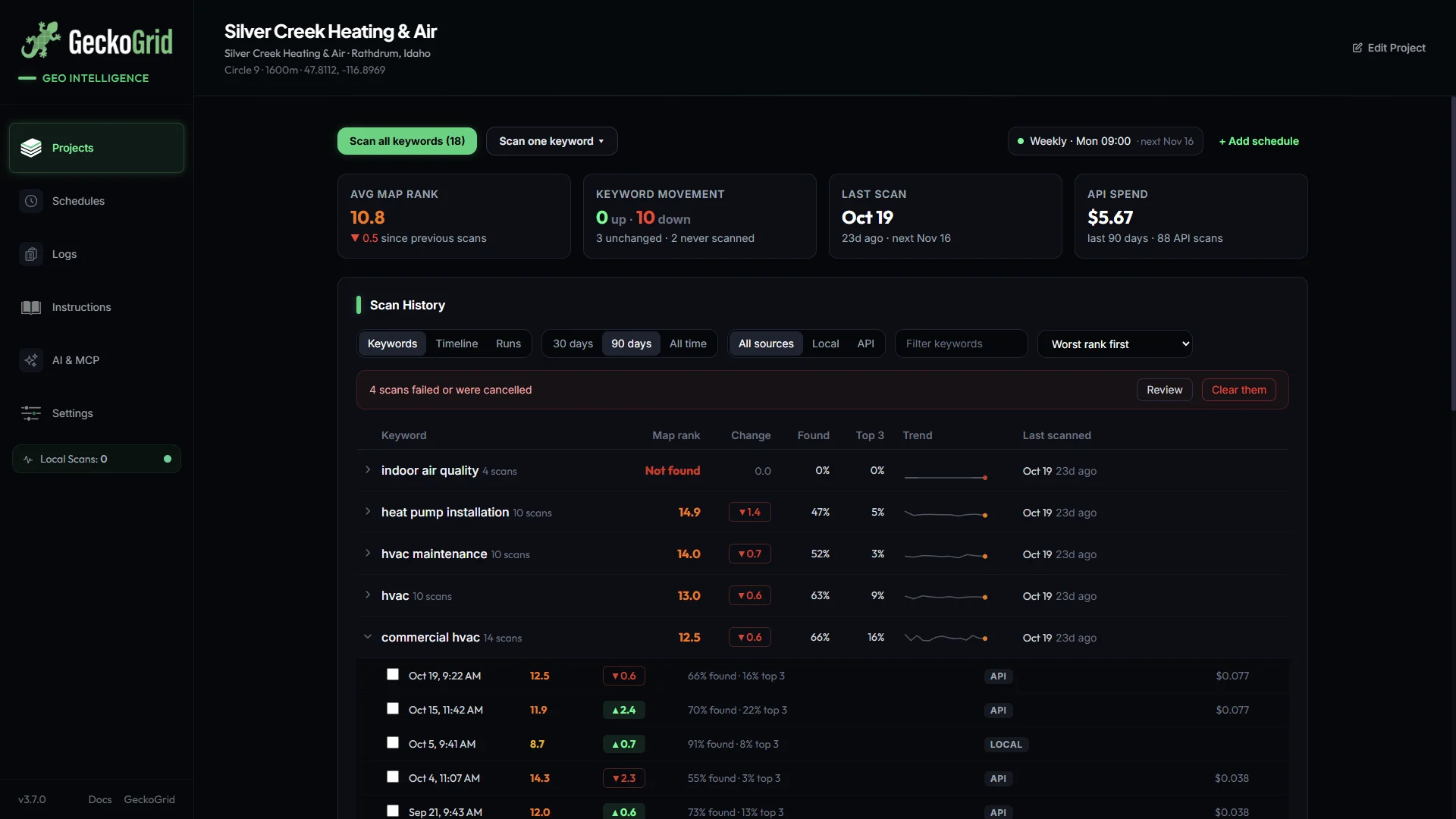
GeckoGrid’s Scan History is built for this kind of before-and-after. The change column compares each keyword’s latest scan with its previous one on the same grid and source, and the Timeline view shows whether the movement holds across several scans or was a one-off.
Read the shape, not just the average
The heatmap tells you more than the average does. After a successful category change you typically see one of two patterns:
- The green area grows outward from your location. Relevance improved, so you now win at points where proximity used to beat you.
- Weak cells flip in one area. You’ve started beating a specific competitor who used a better-matched category than you did.
If instead the whole grid gets uniformly worse, revert the change, wait for things to settle, and re-scan before trying something else.
Additional categories: add, measure, prune
Secondary categories are cheaper to experiment with. Add one at a time for services you genuinely offer and that customers search for, then check the keywords tied to that service on your next scans. If a category adds nothing after a month, it isn’t hurting much, but a tidy list that matches the services on your website is easier for everyone to understand, Google included.
When categories aren’t the problem
If your category already matches the leaders and you’re still losing, look elsewhere: review recency, rating, proximity, and the website. Our diagnostic checklist for Google Maps ranking drops walks through the order we’d check them in, and the Map Pack checklist covers the full set of ranking signals.
Frequently asked questions
How many categories can a Google Business Profile have?
One primary category and up to nine additional categories, ten in total. The primary category carries the most weight; additional categories help you show up for related services.
Does changing my primary category affect rankings?
Yes, often noticeably, in either direction. That's why it's worth testing one change at a time with a before-and-after geo-grid scan on the same grid and keywords, rather than guessing.
How long after a category change should I re-scan?
Scan right before the change, then again after one week and after three or four weeks. Early movement can settle back, so judge the result on scans that agree with each other, not the first one.
Should my primary category match my most profitable service?
Usually, as long as it accurately describes the business. Pick the most specific category that's true for what you mainly do, because Google rewards relevance to the search.
Keep reading
How to Track Local Competitors on Google Maps, Point by Point
Find out who actually outranks a business in the Google Maps local pack, where their territory starts and stops, and which gaps (reviews, rating, category, proximity) explain it, using geo-grid competitor data.
Why Did My Google Maps Ranking Drop? A Diagnostic Checklist
A step-by-step way to work out why a business dropped in the Google Maps local pack: rule out measurement noise, read the shape of the loss on a geo-grid, then check the profile, competitors, and reviews in the right order.
How to Rank in the Google Map Pack, a Working Checklist
The Map Pack ranking factors that move the needle, ordered by effort-to-impact, a working checklist for local SEO practitioners, with the measurement step most skip.