
How to Track Local Competitors on Google Maps, Point by Point

Ask a business owner who their competitors are and you’ll get a list of the companies they see on billboards. Ask Google Maps and you’ll often get a different list, because the businesses that actually take your calls are the ones ranking above you from wherever the customer happens to be standing.
Tracking local competitors properly means answering three questions: who beats you, where they beat you, and why. A geo-grid answers all of them from data you’re already collecting.
Start with the full top 20, not just your rank
Most rank checks record one number: your position. A geo-grid scan can record much more. At every point, GeckoGrid saves the entire top 20, with each business’s name, rating, and review count. Scan a 7x7 grid and you’ve got 49 independent snapshots of the local pack, which is enough to see patterns that no single search could.
Click any point on the heatmap and the panel beside the map shows that list.

One point is an anecdote. The interesting part is adding them up.
Find who beats you most often
Across a whole scan, some names keep turning up above you. GeckoGrid’s Top Competitors list ranks every business found in the scan by how consistently they appear and how high, with their found share, average rank, rating, and review count. There’s also a Top 3 avg vs you comparison at the top, so you can see in one line whether the leaders are winning on rating, on reviews, or both.
A few things to look for:
- A name you didn’t expect. Often a newer business or a multi-location brand that recently opened nearby.
- A rival with a much higher review count. That’s a long game; you won’t close a 1,500-review gap this quarter, so look for where they’re weak instead.
- A rival with fewer reviews who still beats you. More interesting, because whatever they’re doing is cheaper to copy: a sharper category, better proximity, or more recent reviews.
Map where each competitor wins
This is the part a list can’t show. Click a competitor in the leaderboard and GeckoGrid redraws the same grid using their rank at every point. Nothing new gets scanned; it’s the data the scan already collected, viewed from their side.
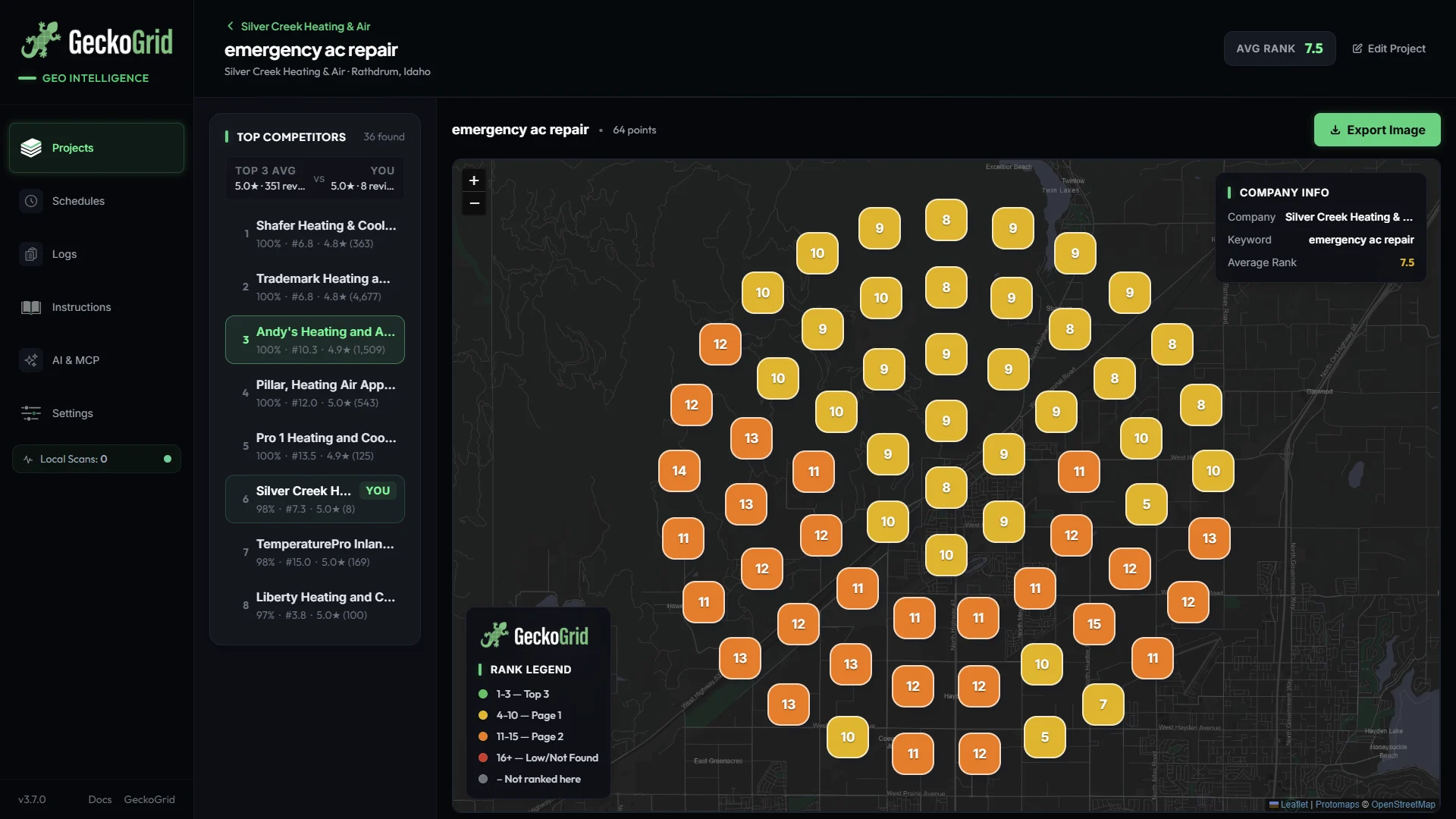
Now you can see territory. Maybe the rival who beats you overall only dominates the eastern third of town, and you’re actually ahead of them everywhere else. Maybe their green zone sits exactly over the neighborhood you lost last month. Either way, you’ve turned “they’re beating us” into a map.
Switch between two or three of the top competitors and the market sorts itself out quickly: whose home turf is where, where the borders are, and which areas nobody owns yet.
Work out why they win there
With a competitor’s territory in front of you, compare the factors you can actually act on:
- Proximity. If their green zone is a circle around their address, they’re winning on distance. You won’t out-locate them, so focus your effort on the edges of their circle, where proximity weakens.
- Primary category. A rival using “Air conditioning repair service” can outrank an “HVAC contractor” for AC searches. Check what categories the leaders use.
- Review recency. Look at their most recent reviews. Steady weekly reviews beat a big pile from three years ago.
- Rating. A 4.9 against your 4.4 matters more than a few dozen extra reviews.
- Hours and availability. For urgent searches, “Open 24 hours” often decides the order.
Pick the one gap you can close fastest and target the area where the competitor is weakest. You enter a market from its edges, not by attacking its strongest point.
Scan the competitor directly
For a serious rival, it can be worth creating a second project centered on their address with the same keywords. Their own grid shows how far their visibility extends and where it thins out, which is exactly where your opportunity is. In GeckoGrid you can add them as a Prospect so they don’t clutter your client list.
Watch for movement over time
Competitors change. A new location opens, a rival hires an agency, someone starts a review campaign. Because every scan stores the full top 20, you can spot a competitor gaining ground in your scan history before it becomes a drop of your own:
- A new name appearing in the leaderboard for several keywords at once.
- A rival’s review count jumping between monthly scans.
- Their territory on the competitor heatmap creeping toward yours.
If your own rank did slip, our diagnostic checklist for Google Maps ranking drops walks through what to check, in order.
Make it part of the report
Clients understand competitors far more easily than they understand averages. A side-by-side of their heatmap and the leading rival’s heatmap, from the same scan, explains the market in one slide: here’s where you win, here’s where they win, here’s the plan for the border. Presenting heatmaps to clients covers how to put that in front of them.
Frequently asked questions
Who are my real competitors on Google Maps?
The businesses that rank above you at the grid points where your customers search, which often isn't the list you'd guess. A geo-grid scan records the full top 20 at every point, so your real competitors are the names that keep appearing above you across the grid.
Can I see a competitor's ranking without them knowing?
Yes. A geo-grid scan reads public Google Maps results, the same results anyone searching would see. Competitors aren't notified and nothing touches their profile.
Why does a competitor with fewer reviews outrank me?
Usually proximity, category, or review recency. If they're closer to the searcher, use a more specific primary category, or have been getting reviews more recently, they can outrank a business with a bigger lifetime total.
How often should I check competitors?
Every scan already captures them, so check whenever a keyword moves. A monthly look at the leaderboard for your main keywords is enough to spot a rival gaining ground before it shows up as a drop of your own.
Keep reading
How to Win Local SEO Clients With a Geo-Grid Prospect Audit
A practical prospecting workflow for agencies and freelancers: pick the right local businesses, scan them, turn the heatmap into a short audit with a fix plan, and send outreach that gets replies.
Google Business Profile Categories: How to Choose Them and Test the Change
Your primary Google Business Profile category is the strongest relevance signal you control. How to pick primary and secondary categories, spot what competitors use, and measure a category change with before-and-after geo-grid scans.
How to Track Google Maps Rankings Over Time Without Fooling Yourself
Most rank trends lie a little. How to track local Map Pack rankings over weeks and months so the change you report is real: one rank definition, identical grids, one engine, and the right views.